 support@bizdata360.com
 +1-650-283-1644
 AI Enabled Data Integrations and AnalyticsAI Enabled Data Integrations and Analytics
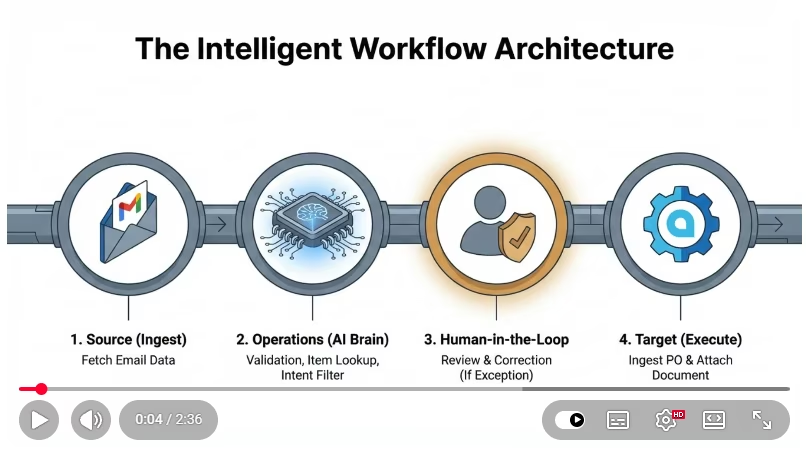
This demo explains how to automate Purchase Order (PO) ingestion from email into Acumatica ERP using an AI-powered integration workflow built with eZintegrations.
Incoming emails with attachments are intelligently scanned, validated, and processed. The system identifies whether an attachment is a valid Purchase Order, ignores non-PO documents, and ensures only verified data is ingested into Acumatica ERP.
Reads only unread emails from a monitored inbox
Supports multiple attachment formats (PDF, PNG, JPEG, multi-page PDFs)
Uses AI to identify Purchase Orders vs non-PO documents
Drops irrelevant files before entering AI processing
Performs PO lookup and validation before ingestion
Creates or updates Purchase Orders in Acumatica ERP
Attaches original source documents directly to the PO record
Prevents duplicate processing by marking emails as processed


© Copyright 2026 Bizdata Inc. | All Rights Reserved
 Watch Demo
